Agentic tasks for HubSpot’s Start Guide
I led design for the Marketing Hub and Revenue Hub tasks that turned HubSpot’s Start Guide from a checklist into work Breeze, HubSpot’s AI assistant, does with you. We had two months to ship them before UNBOUND, HubSpot’s annual customer conference.
Then I designed a standard ending for every task, and built a skill so engineers could get it right without me.
- 2 months
- From mapping tasks to launch, before HubSpot’s annual conference
- 6
- Marketing Hub tasks I mapped with my PM, two for each of 3 goals
- 6 + 4
- Ways a task can end in the closing spec, plus its 4 error states
- My role
- Product Design Lead, Customer Journey
- Timeline
- Two months, July to August 2026
- Marketing Hub tasks launched August 10
- Revenue Hub tasks launched with every other hub by August 31
- Task closing spec and skill finished in September 2026
- Scope
- Everboarding: what customers do after intake sets up their portal
- Start Guide tasks that launch agentic flows in Breeze, HubSpot’s AI assistant
- Marketing Hub goals: Build brand awareness, Generate new leads, Nurture existing leads
- Revenue Hub goal: Get paid faster
- Scale
- The Marketing Hub Start Guide: 3 goals, 5 task groups, and 25 tasks, mixing agents, tours, and redirects
- 8 of those tasks agentic at launch, released with every tour
- 4 agentic tasks released to Revenue Hub
- Pro customers saw them in the Start Guide; Free and Starter saw them in the User Guide
- Team
- 2 product managers
- 1 more product designer, who owned the lead generation and nurture tasks
- An engineering lead for each task
- The Marketing Hub team and the Breeze platform team
- What I owned
- The task flows for the awareness campaign, brand visibility, and marketing email tasks
- The Revenue Hub product and quote template tasks
- The rules for what Breeze does on its own, written with my PM
- The artifact display options and their fallbacks
- The task closing spec and the task closing skill
- Design alignment with the Marketing Hub team
- Tools
- Figma
- Claude prototypes
- Platform
- SaaS web application, inside Breeze
Customers finished setup, landed on a checklist, and most closed it within a minute
Intake was working. A new customer could go from signup to a configured portal in about four minutes. Then they landed on a list of everything left to do.
HubSpot had tried that list several times. 82% of customers closed one version of it within a minute. Only 19% of the people who saw it interacted with it at all. Activation didn’t go up. Two versions lowered it, one by 4 points.
One customer put it plainly:
“There were so many features. I didn’t know where to start, and I just bailed.”
The problem wasn’t how the list was designed. A list of setup steps makes HubSpot look like work. Customers don’t get value by finishing a checklist. They get it when HubSpot helps them reach the outcome the checklist was supposed to unlock.
Marketing Hub had the sharpest version of the problem. Only about 30% of Pro customers reached a core activation milestone by day 30. Campaign setup was the hardest part, and a blank campaign builder is the worst possible first screen for someone new.
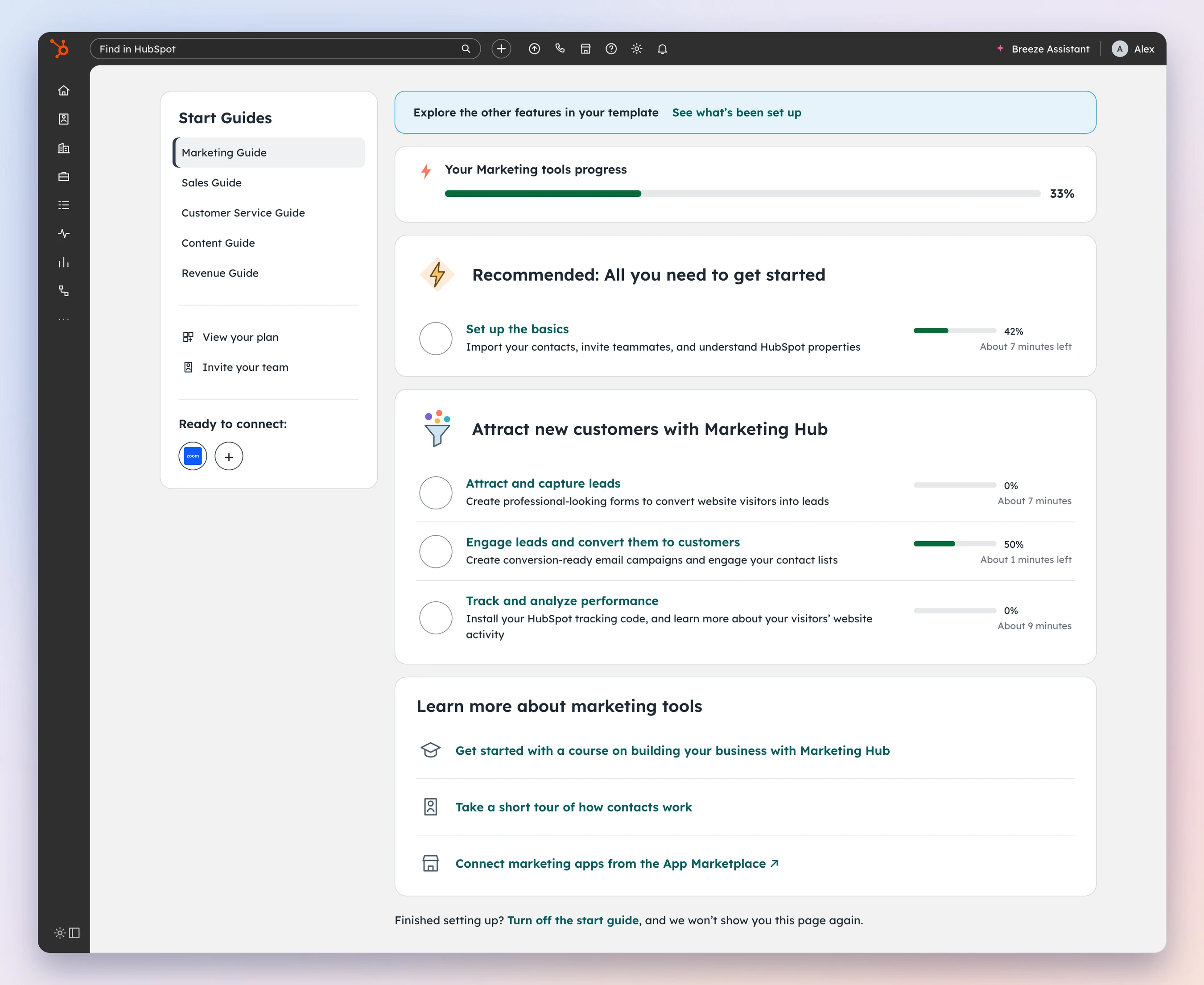
The real question wasn’t what went on the list, it was who did the work
We had a choice to make before UNBOUND, HubSpot’s annual customer conference. Keep the Start Guide as a list of tasks, or let Breeze, HubSpot’s AI assistant, do the tasks with the customer.
We landed in between, and it was the right call for two months. The Start Guide stayed as the map for Pro customers. Its most important tasks now opened Breeze, and Breeze built the thing instead of explaining how to.
That changed what the customer’s job was. In the old model, the customer builds and HubSpot explains. In ours, Breeze builds first and the customer reviews and corrects. Every flow I designed had to make reviewing easy, because that was now the work.
Customers had told us why this mattered.
“It asked what I wanted to do. I said manage a small team. But then... it didn’t change anything. Same stuff as everyone else.”
Breeze could carry what they told us at intake into every task.
This was a step, not the destination. The longer-term direction is everboarding: a system that remembers goals, progress, and past decisions, recommends the next action, and picks up where the customer left off when they come back. The tasks we shipped had to work now and fit that later.
Same task in both: “Send your first marketing email.”
Checklist
Customer builds, HubSpot explains- CustomerCustomer reads the task
- CustomerOpens the email tool
- CustomerPicks a list
- CustomerWrites the email
- CustomerChecks the domain
- CustomerSends
Agentic task
Breeze builds, customer reviews- BreezeBreeze reads the portal
- BreezeProposes the list
- BreezeWrites the draft
- CustomerCustomer reviews
- CustomerCustomer corrects
- BreezeSaved as a draft
Two months meant mapping the fewest tasks that mattered, not every task we had
My PM and I ran the Marketing tiger team. We had to pick the tasks for every Marketing Hub goal, get each Hub team to agree, and hand engineering a map they could build from.
We agreed on one rule early: incomplete coverage is fine. The goal was the right two tasks for each goal, not every task the product offers. We reused what already worked and built new flows only where they mattered most.
Each goal got two tasks, and each task had to leave the customer with something real. Activation for these goals meant a first contact from a form, or a first marketing email sent to five or more contacts.
| Goal | Tasks | What the customer walks away with |
|---|---|---|
| Build brand awareness | Create a multi-channel awareness campaign · Review your brand visibility | A campaign ready to publish |
| Generate new leads | Create a lead generation campaign · Capture leads with forms | A form ready to capture a first contact |
| Nurture existing leads | Create a lead nurture campaign · Send a marketing email | A first marketing email, ready to send |
| Get paid faster (Revenue Hub) | Create your products · Set up a quote template | A quote a rep can send |
I designed three of the Marketing Hub tasks. Another designer on my team designed the lead generation, forms, and nurture tasks. I designed the Revenue Hub product and quote template tasks.
Build brand awareness
- Create a multi-channel awareness campaignMy design
- Review your brand visibilityMy design
A campaign ready to publish
Generate new leads
- Create a lead generation campaign
- Capture leads with forms
A form ready to capture a first contact
Nurture existing leads
- Create a lead nurture campaign
- Send a marketing emailMy design
A first marketing email, ready to send
Get paid faster
- Create your productsMy design
- Set up a quote templateMy design
A quote a rep can send
I wrote the rule for what Breeze should do on its own and what stays with the customer
Every team building a task was asking the same question: should this be agentic? Without one answer, we’d ship eight tasks that each drew the line somewhere different.
With my PM, I wrote the eligibility rules engineers, PMs, and designers used to decide. The core test was simple. If the customer has to do the steps themselves, it’s a guided wizard wearing an agent costume. It stays a tour.
The rules named what stays out, and why:
| Task | What Breeze does | Why |
|---|---|---|
| Help desk redirects, OAuth, third-party integrations | Link to the docs | Outside what an agent can do safely |
| Domain authentication and DNS records | Link to manual instructions | One mistake can break the customer’s site or business |
| SEO changes to live website settings | Recommend; the customer makes the change | High risk of breaking the website |
| Ads, forms, landing pages | Save as a draft | The customer can’t preview the output before it goes live |
| Emails in a multi-channel campaign | Save as a draft | Some pieces would be actionable and some wouldn’t |
| A standalone email | Complete it agentically | Nothing else depends on it |
One more rule: if a HubSpot Academy video exists for the task, Breeze embeds it in the chat. It never just links out.
I wrote a Markdown version too, so engineers could paste the rules straight into the Claude skills they were building.
In every task I designed, Breeze went first and the customer’s job was to check it
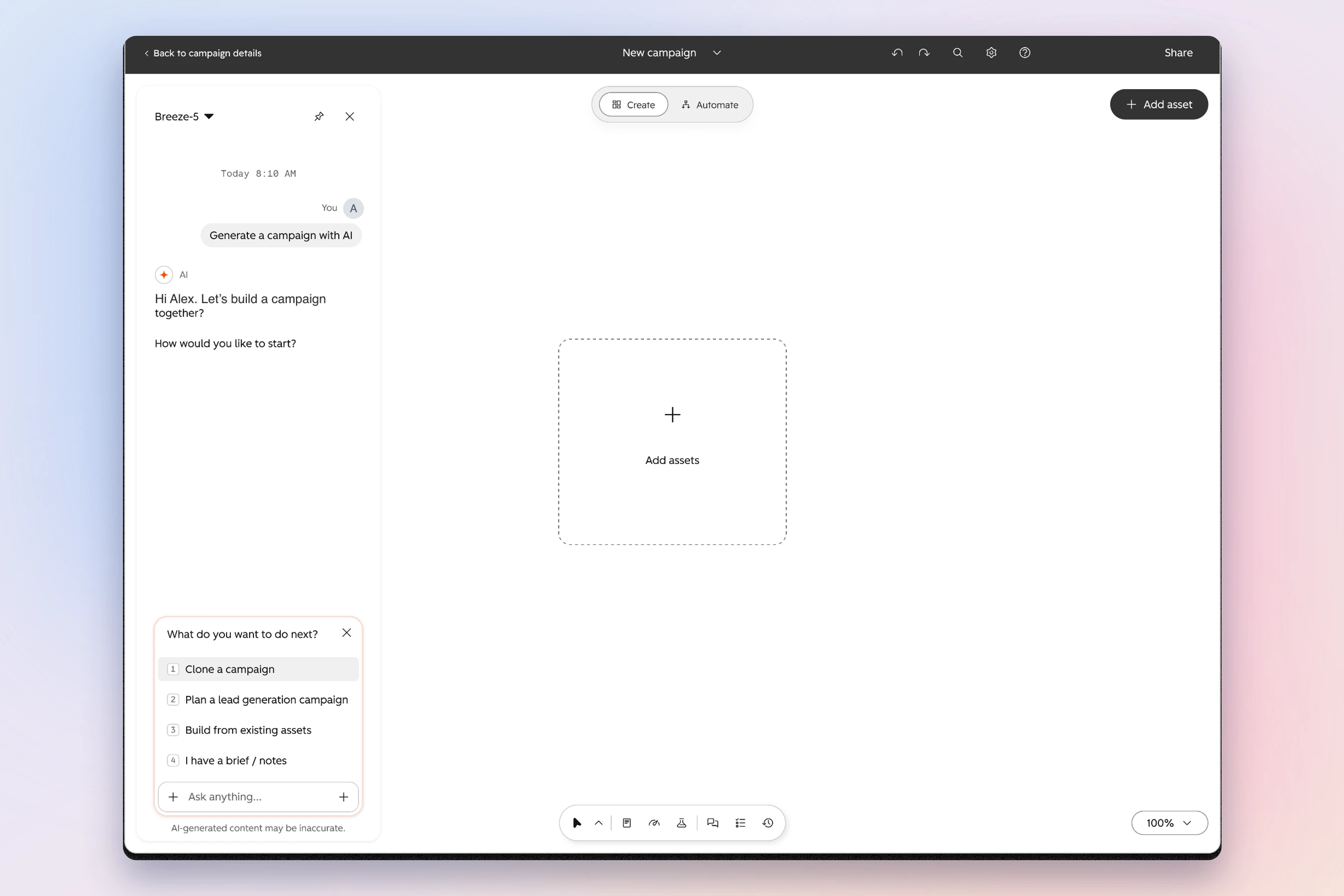
Each task followed the same shape. Breeze reads what it already knows, builds a first version, and asks the customer to confirm or change it. The customer never starts from a blank screen.
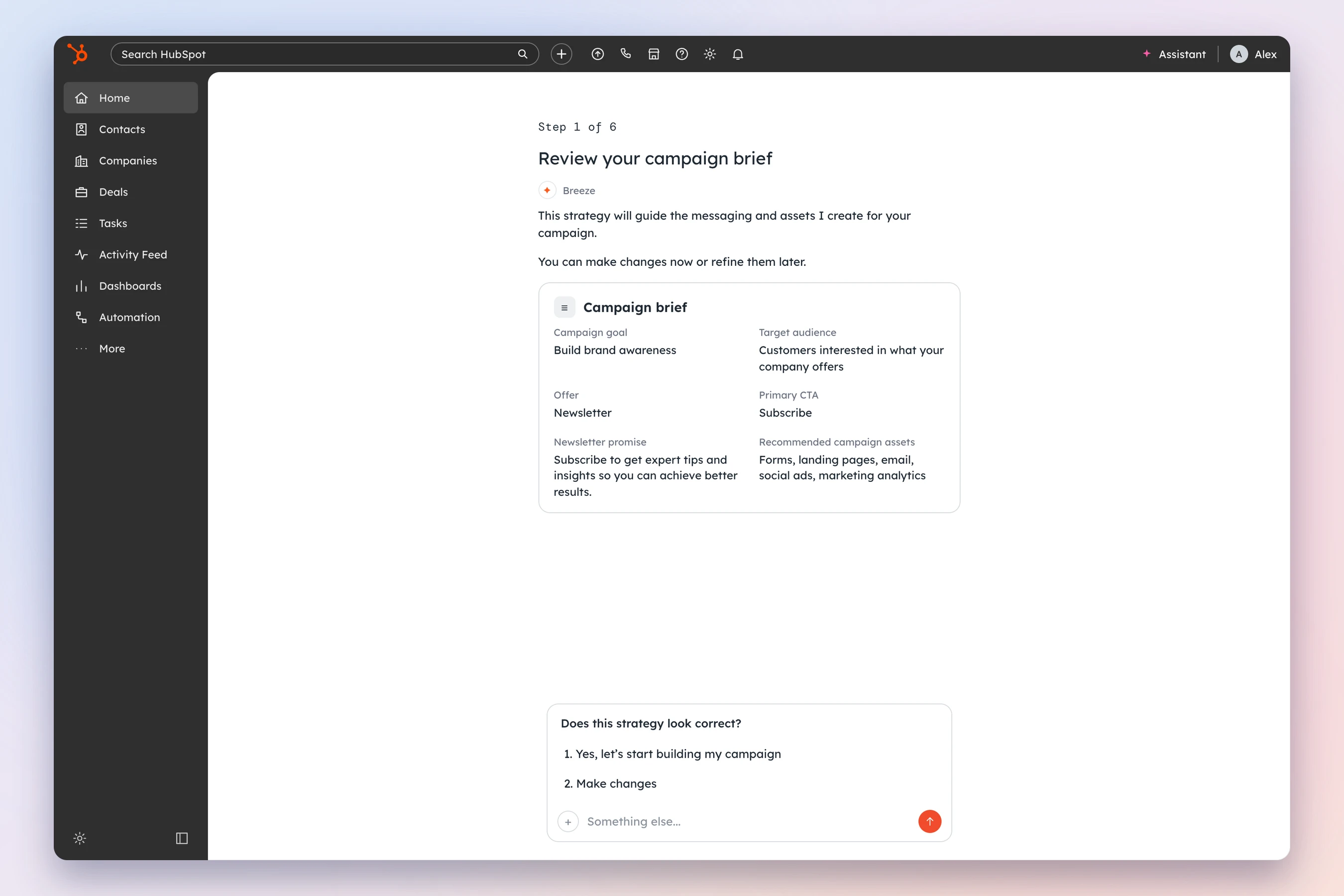
The awareness campaign. Breeze opens with a campaign brief it filled in from the account: the goal, the audience, the offer, the call to action, and which assets to make. The first question is “Does this strategy look correct?” Everything after that builds from the brief the customer approved.
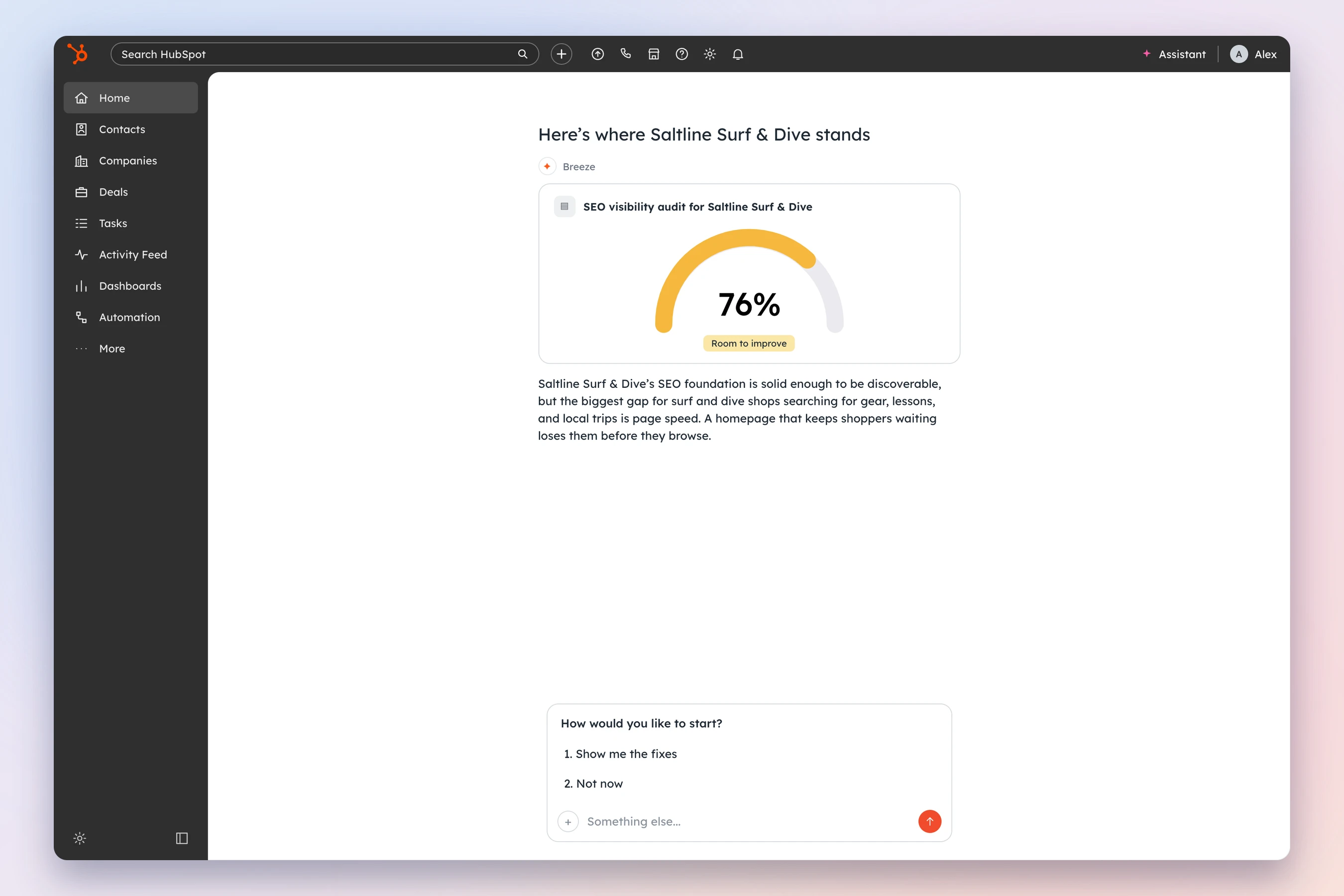
Brand visibility. Breeze audits the site and shows a visibility score with the biggest fixes, each with the time it takes and its impact. The customer picks which fix to start with. Breeze recommends, and the customer makes the change, because changing live site settings can break a website. Late in July we learned AI search visibility and SEO couldn’t run in the same flow, so I split them into two.
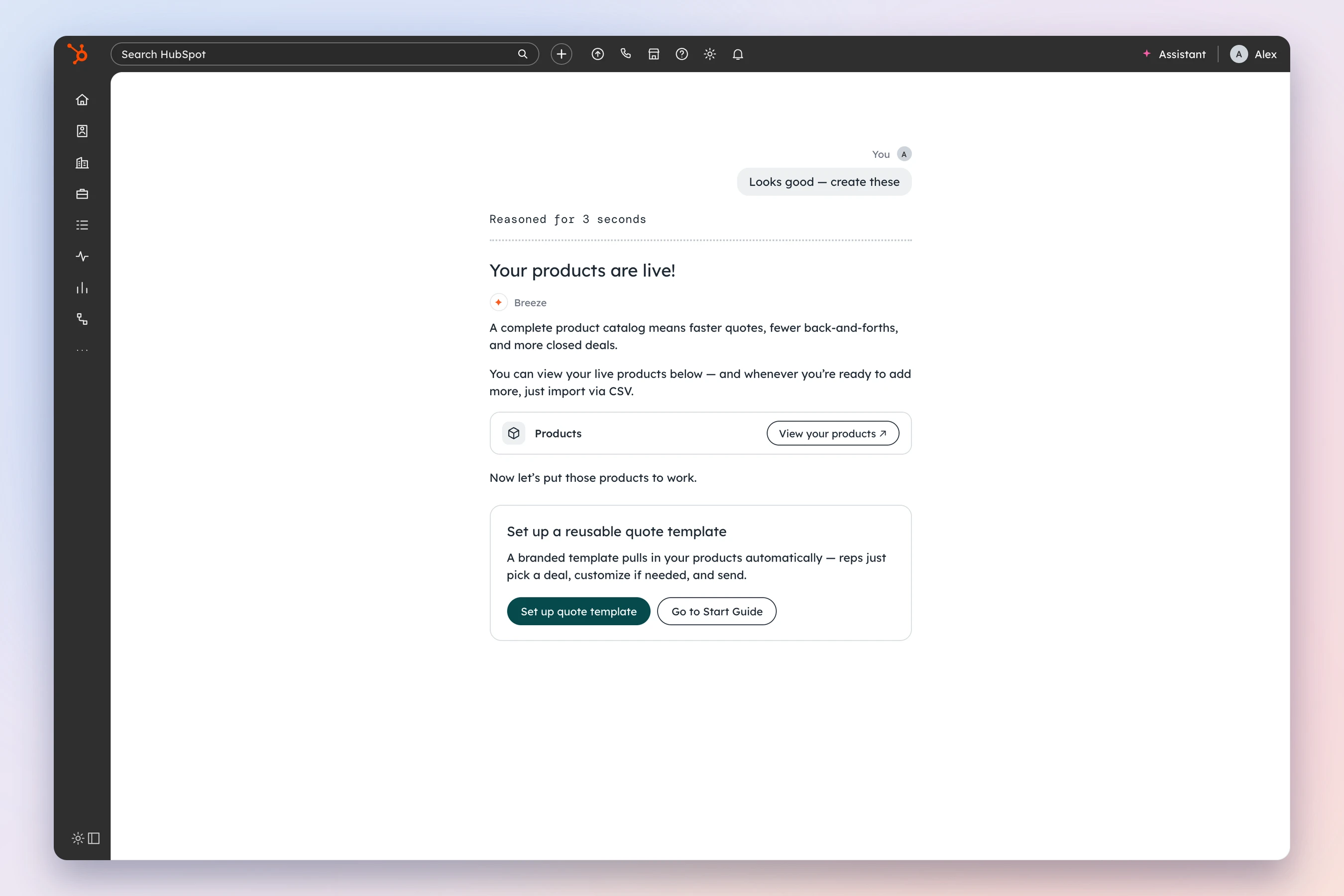
Products and the quote template. On Revenue Hub, Breeze creates the products, then offers the quote template that pulls them in automatically. Each task hands off to the one that depends on it, so the customer never has to find the next step.
In the email task, I put every warning after the work, not before it
Sending a first marketing email has real risks. The domain might not be authenticated. The list might have been emailed twice this week. The person might not have permission to send.
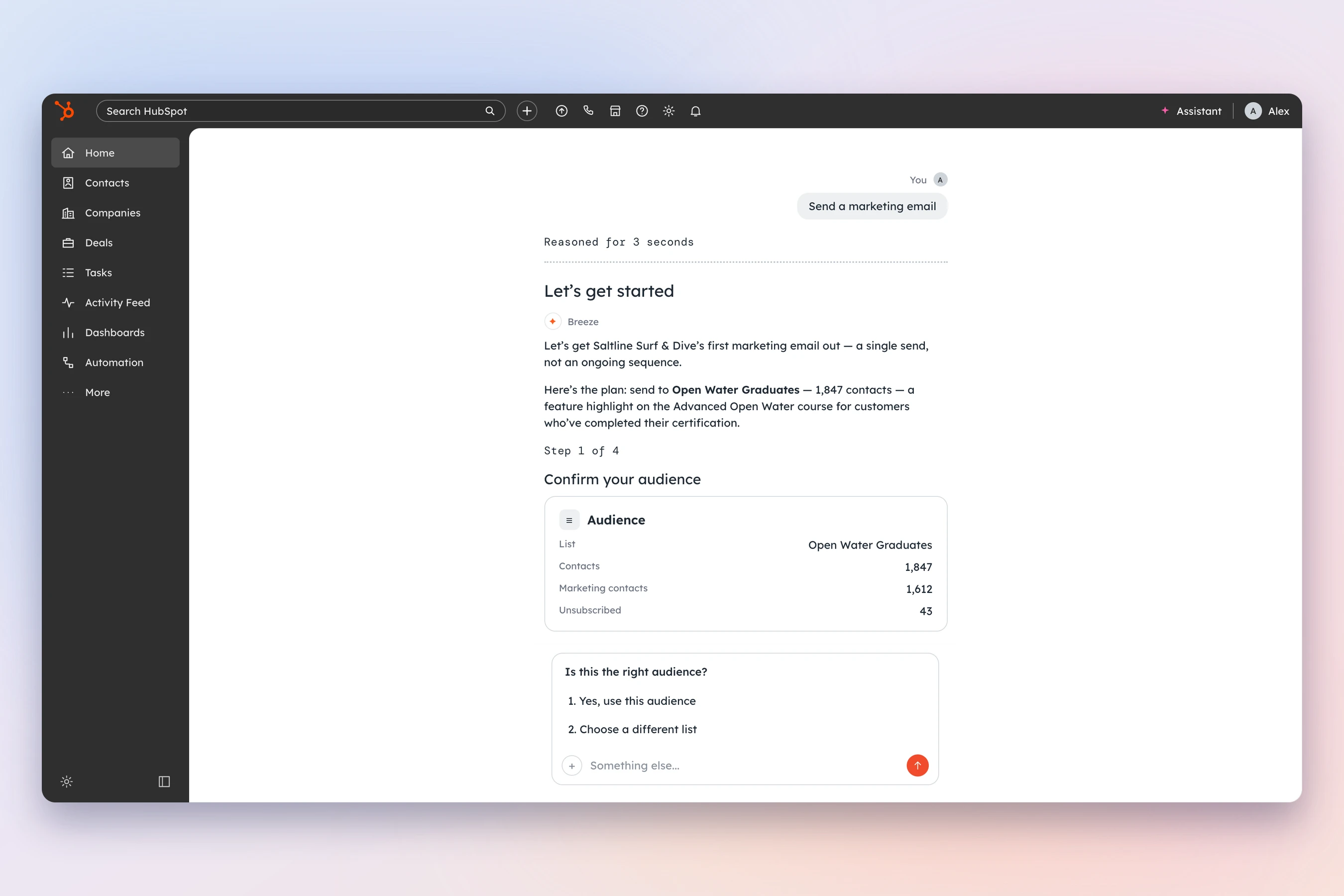
The easy design asks about all of that up front. That’s how you lose people before they’ve seen what Breeze can do. So Breeze checks everything silently the moment the task opens, and only raises a risk when it becomes relevant.
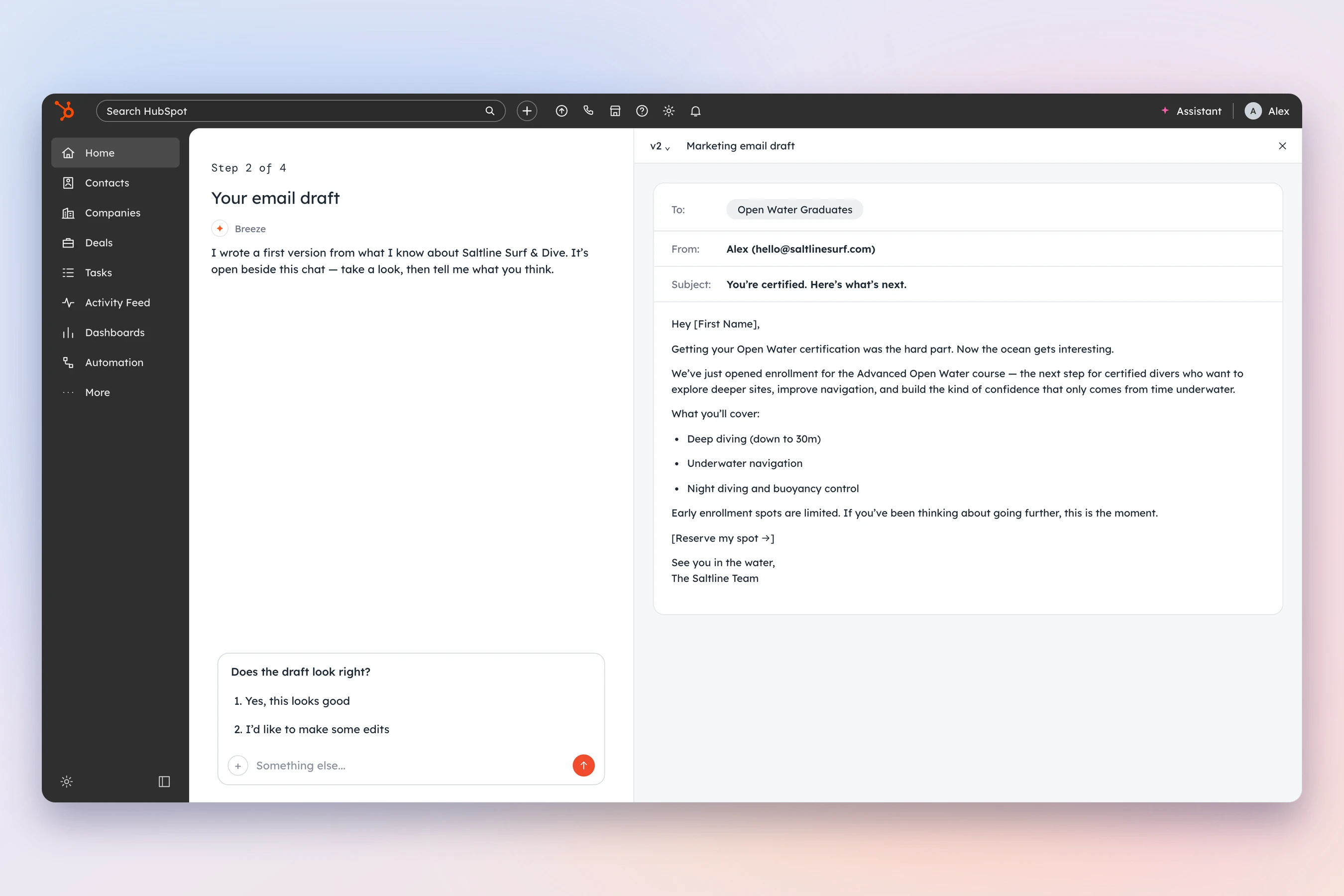
The flow opens with a plan, not a question. Breeze names the list and the contact count, and writes the angle from what it knows about the business. For a customer with past sends, it starts from the open rate of their last email. For one whose sales team already uses HubSpot, it frames the send as marketing reaching those contacts for the first time.
Domain authentication comes up only after the draft is approved. The warning gives two paths: set it up, or continue knowing the risk. It warns without blocking. And a teammate without send permission still gets the full draft first, then copyable steps to send to their admin. No dead ends.
Two weeks before launch, the platform couldn’t show half of what I’d designed
Late July brought three constraints in one week.
AI search visibility and SEO had to become separate flows. The canvas side panel couldn’t show forms, landing pages, or ads. And there was no save and return: if a customer left a task halfway, they started over.
I couldn’t wait for the platform to catch up. So I wrote up the ideal artifact display and three fallbacks, each with its trade-offs, so the people making the call could decide quickly:
| Version | How the customer sees what Breeze made | The trade-off |
|---|---|---|
| Ideal | Live in the canvas, next to the chat | Best experience; the canvas wasn’t ready everywhere |
| V1a | A card that opens the artifact in a new tab | Works everywhere; breaks the conversation |
| V1b | A text card, no visual | Fastest to build; customers may not know it exists |
| V2 | Every artifact at once, as cards | Easy to find; breaks the step-by-step flow |
Then I designed each task to work both ways: with the artifact showing, and without it.
Ideal
Best experience; the canvas wasn’t ready everywhere
V1a
Works everywhere; breaks the conversation
V1b
Fastest to build; customers may not know it exists
V2
Easy to find; breaks the step-by-step flow
Then we decided Breeze would stop at the draft, and I redesigned every ending
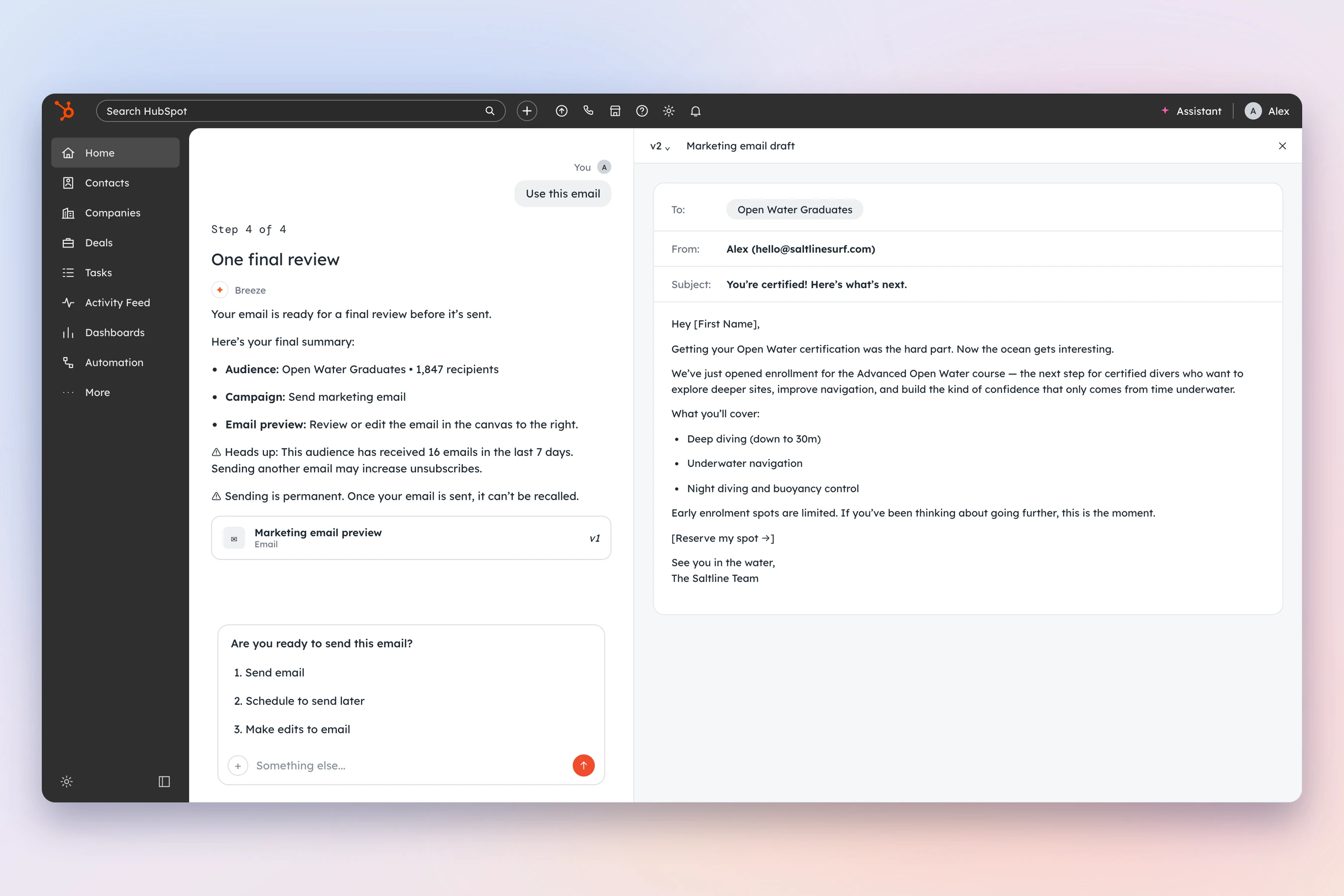
On August 7, the Marketing Hub team and my team made a call. Agentic flows would stop at the draft. No emails sent, no campaigns or forms published from inside the chat.
I’d already designed the email task to end with a send. The final screen asked “Are you ready to send this email?” with send now, schedule, and edit. That screen didn’t ship.
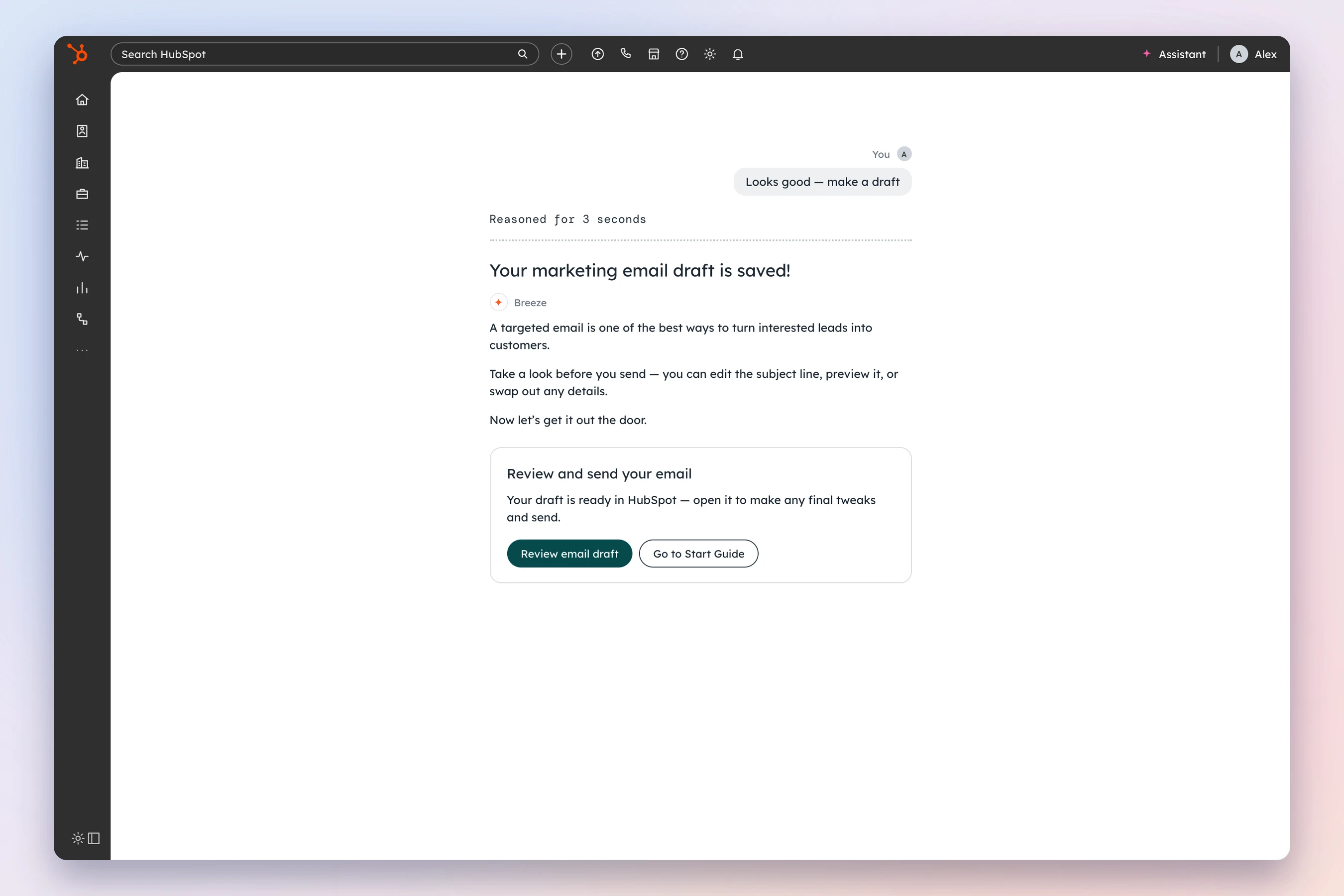
It was the right call. I wrote down why: onboarding is responsible for a warm start, not for running the whole campaign. Breeze removes the blank page. Then it saves the work as a draft and hands the customer to the right place in HubSpot to finish it. From there, the Marketing Hub team’s in-product tours take over.
That moved the most important screen in every task to the end. The ending now had to explain what was saved, why it mattered, and exactly where to go next.
I argued we shouldn’t copy Marketing Hub’s own AI tool, because our customers weren’t its customers
Marketing Hub was building its own AI campaign tool at the same time. Same job, different first screen. Theirs opens on a blank brief the marketer fills in. Ours opens on a brief Breeze has already filled in.
The obvious move was to make them match. I wrote a design POV arguing the opposite. Their user is an experienced marketer with a campaign in mind. Ours is a new customer deciding in the next 15 minutes whether HubSpot works. Theirs puts the effort up front for control. Ours puts it at the end, to get to value fast.
The real risk of matching them was worse than inconsistency. We’d have built a simplified campaign tool that customers would outgrow and abandon for the real one. So the principle I wrote was: same outcome, different starting point, not two competing destinations. Breeze removes the blank page. Marketing Hub stays the place for serious campaign work.
Same agents underneath, same finish line. I also named what each team could learn from the other. Which fields their users skip tells us what to fill in. How often our users correct Breeze tells them what they can stop asking.
I proposed one measure for both: how often customers complete a task on day one. The second signal is how often they correct what Breeze assumed. Fewer corrections means Breeze is earning trust.
Every task ended differently, so I wrote one ending for all of them
Every task team was writing its own ending. Left alone, some would say “Done!”, some would repeat the button label, and some would leave the customer with nowhere to go. Once the finish line moved to the ending, an inconsistent ending was where we’d lose people.
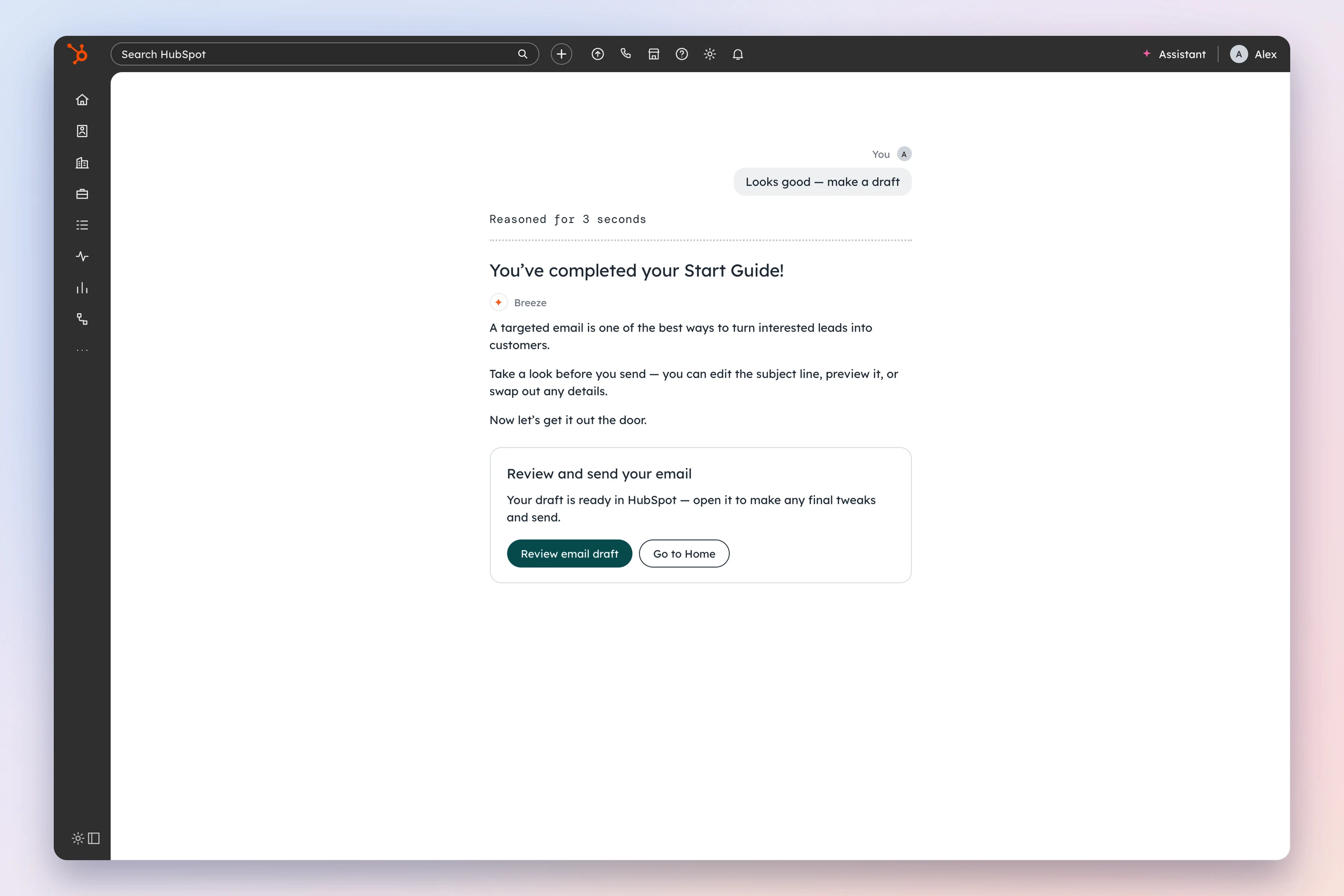
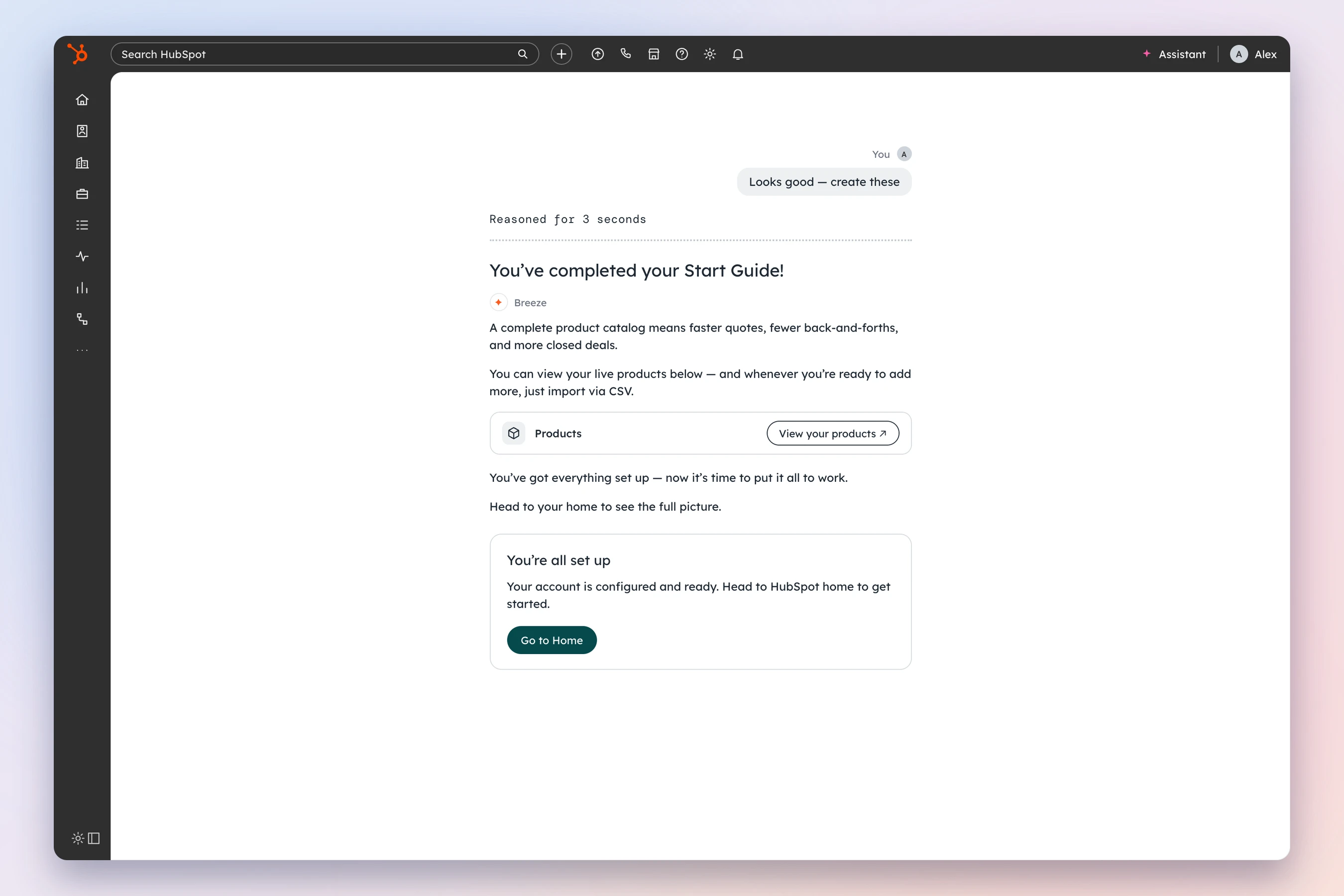
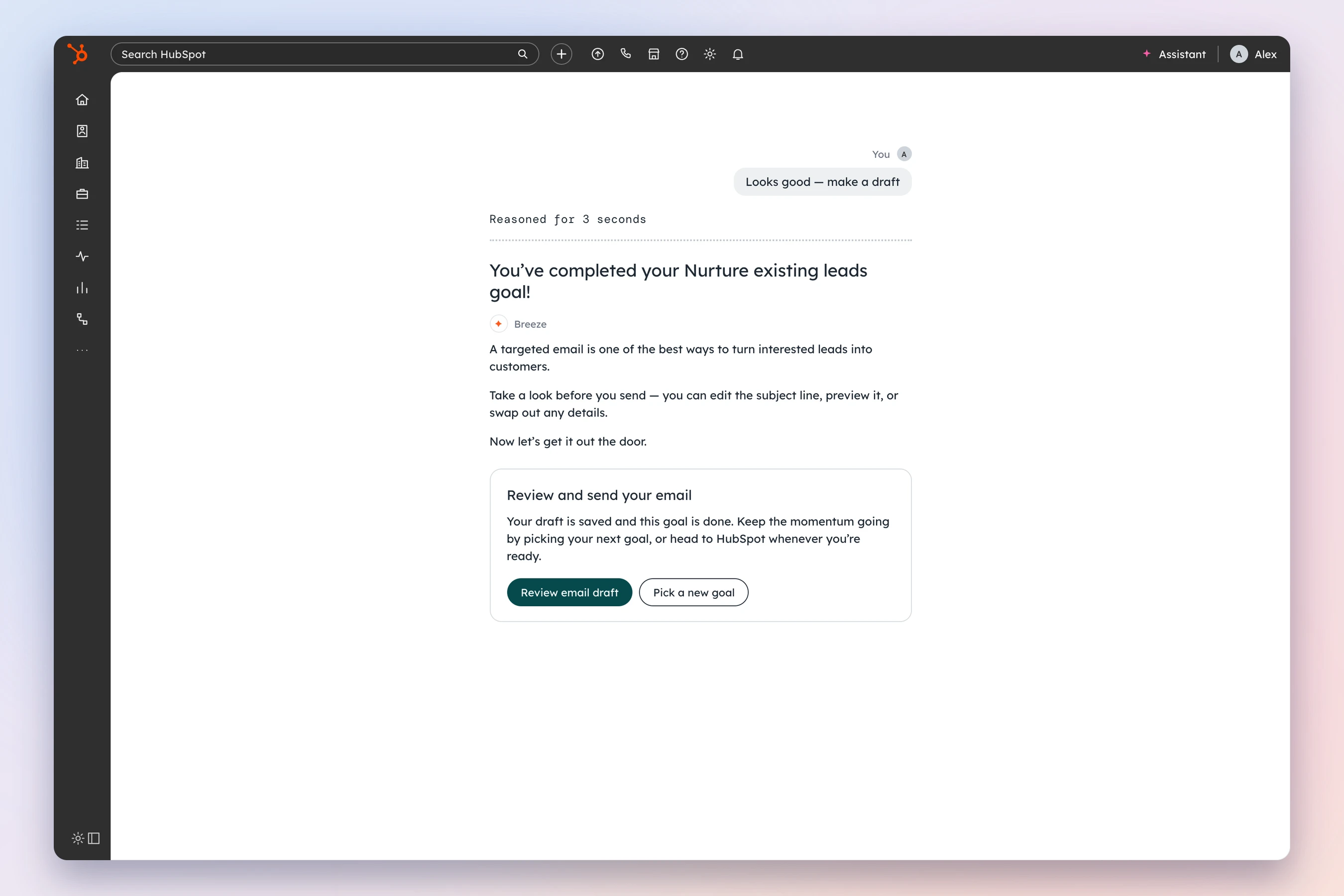
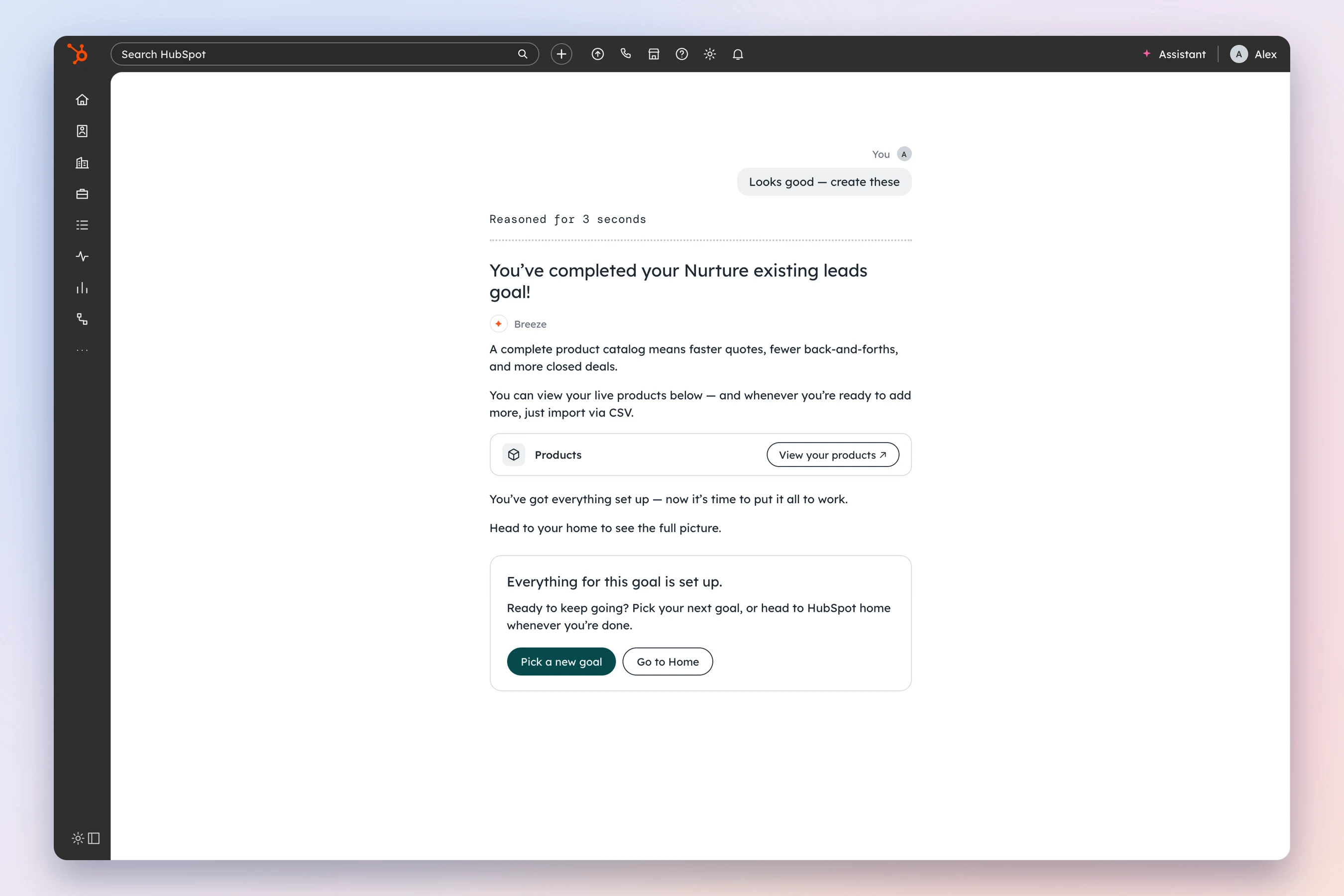
I wrote a closing spec that every agentic Start Guide task follows. Each ending has three parts, always in this order:
- A success heading that names what was done, in the past tense. “Your products are live!”, never “Done!” or “Success.”
- A short note from Breeze. The first sentence says why it matters for the business, not what just happened. The last sentence always moves forward.
- A next-step card with one clear primary action and one secondary.
The next-step card changes with where the customer is:
| Variant | When it shows | Primary action |
|---|---|---|
| A | The draft needs finishing in HubSpot | Go straight to that draft |
| B | The task is done; another task builds on it | Start the next task |
| C.1 / C.2 | Every task and every goal is done | Finish the last thing, or go to HubSpot home |
| D.1 / D.2 | Every task in this goal is done, but other goals remain | Finish the last thing, or pick a new goal |
The next task is never random. It has to follow from what the customer just did. Products lead to a quote template.
I designed for failure too. If Breeze only finished part of a task, the heading only claims what succeeded and the card offers a way to recover. If it failed, there’s no success heading at all, and the task isn’t marked done. If we can’t confirm everything is complete, we never show the celebration.
1Your products are live!
✦ Breeze2A complete product catalog means faster quotes, fewer back-and-forths, and more closed deals.
Now let’s put those products to work.
Set up a reusable quote template
A branded template pulls in your products automatically — reps just pick a deal, customize if needed, and send.
- 1
Heading
Past tense, names what was done, ends with !
- 2
Breeze note
Sentence 1: why it matters. Last sentence: moves forward.
- 3
Next-step card
One primary action, one secondary.
- 4
Products card
Variant B only: one card for everything that was built.
Then I turned the spec into a skill engineers run, so the ending holds up without me
A spec only works if people read it. With more than twenty tasks across every hub, engineers would be writing these endings without a designer in the room.
So I built the task closing skill. It works two ways:
- Generate. An engineer gives it the task, whether it ends in HubSpot or in another task, and how much of the goal is done. It picks the variant, writes the heading, the note, and the card, and flags which errors to handle.
- Audit. An engineer pastes in an ending they’ve built. The skill checks it against every rule in the spec and returns what passes and what doesn’t.
Every ending it writes also has to pass the HubSpot UX copy skill before it ships. A good ending is a rule now, not a review comment.
Input
- Task completed
- created 3 products
- Task type
- Next-Task
- Goal status
- tasks remaining
- Overall status
- goals remaining
- Hub
- Revenue Hub
- Next task
- set up a quote template
Output
- Variant
- B
- Heading
- “Your products are live!”
- Body
- “A complete product catalog means faster quotes, fewer back-and-forths, and more closed deals.”
- Card title
- “Set up a reusable quote template”
- Primary
- “Set up quote template”
- Error check
- Confirm all 3 products were created before showing this; if not, use E.1.
Ending to audit
- Heading
- “Done!”
- Body
- “Your email was saved as a draft.”
- Primary
- “Go to HubSpot.”
Report · 1 of 6 rules pass
- ✕Heading is generic
- ✕Heading doesn’t name the task
- ✕Body restates the heading instead of saying why it matters
- ✕No sentence that moves forward
- ✕“Go to HubSpot” is too generic for a CTA
- ✓Breeze attribution present
How my work helped other people do their best work
- I gave engineers rules they could run, not just read. The eligibility rules came with a Markdown version to paste into the Claude skills they were building. The closing spec came with a skill that writes and checks endings.
- I prototyped in code, so reviews were about behavior. I built the closing experience as a working Claude prototype, so people could click through the variants instead of reading about them.
- I aligned two teams before launch, in writing. I wrote what our ideal flows were, what the limits were, and what V1 would actually look like. I also owned handing the Marketing Hub team the final state of every flow, so their tours could start where ours stopped.
- I left a fast-follow list with owners. Duplicate tasks after launch, what an in-progress task looks like in the Start Guide, upgrade suggestions inside tasks, and a back button that works in agentic flows. Each one had a name next to it.
# Agentic Task Eligibility Rules

## The Core Test
If the customer has to do the steps themselves, it's a guided
wizard wearing an agent costume. It stays a tour.

## What stays out, and why
| Task                                   | What Breeze does            | Why                                    |
| -------------------------------------- | --------------------------- | -------------------------------------- |
| Help desk redirects, OAuth, integrations | Link to the docs          | Outside what an agent can do safely    |
| Domain authentication and DNS records  | Link to manual instructions | One mistake can break the site         |
| SEO changes to live website settings | Recommend; customer changes | High risk of breaking the website |What shipped
From mapping the tasks to launch
Agentic tasks and every tour, released to Marketing Hub on August 10
Agentic tasks released to Revenue Hub by August 31
For what Breeze does on its own, written for every hub’s tasks
Endings and error states in one closing spec, for every Start Guide task
In the task closing skill: generate an ending, or audit one
- Where we started
- 82% of customers closed the old checklist within a minute, and only 19% interacted with it.
- Activation didn’t go up on any checklist version. Two lowered it, one by 4 points.
- Only about 30% of Marketing Hub Pro customers reached a core activation milestone by day 30.
Scope and delivery numbers. Outcome data isn’t in yet.
What the numbers don’t prove
How I’ve changed
What I stopped doing: designing the ideal flow first and the fallback later. Three constraints in one week taught me to design the fallback alongside the ideal, from day one.
What I do now: write the rule, not just the screen. A screen solves one task. A rule, like the eligibility test or the closing spec, solves the next forty tasks I’ll never see.
What I learned about AI products specifically: where an agent stops matters as much as what it does. Stopping at the draft wasn’t a limitation. It’s what made the customer trust handing it the work.
What I’d do differently: lock the platform constraints in week one. We found out what the canvas couldn’t show two weeks before launch. I’d have asked engineering to try the hardest artifact first.